I do not want to build manually, is there any automation?
The modern recommendation for automation is using packit, which does all of
the scheduling of builds and subsequent tests if requested. This automation
involves setting up a dist-git-like repository (a hosted git repo containing
only the spec file and the sources/patches) and onboarding packit
integration.
Packit automation
After setting up a dist-git-like repo with packit integration, you can start
configuring the setup. You can use packit init to create the initial
.packit.yaml configuration file, or just create it manually. There are some
initial settings you need to configure
# This is actually the only required field to configure
specfile_path: my-package.spec

# Packit is by default setup to work for either an upstream project with
# sources builtin or downstream Fedora. Here we set it up to work for a generic
# dist-git-like repo. If you have more specific automation requirements see
# https://packit.dev/docs/configuration/actions
actions:
  # Use the sources defined in the specfile instead of a git archive of the
  # current repo (used by upstream projects)
  fix-spec-file: []

# What distro to build on
targets:
  - fedora-rawhide

# Define what jobs to run and when
jobs:
  # Build the package in copr for each commit. The copr project is managed by
  # packit. For more details see
  # https://packit.dev/docs/configuration/upstream/copr_build
  - job: copr_build
    trigger: commit
For a full list of configuration options see the packit documentation.
At this point you can simply push commits in the repo and explore the build process.
Multi-package configuration
One big thing you can do with the automation is to build packages that depend on each other. In this case you need to setup a monorepo packit setup, basically a dist-git-like repo in separate directories
$ tree -a .
.
├── .packit.yaml
├── pkg1
│   └── pkg1.spec
└── pkg2
    └── pkg2.spec
with equivalent structure presented in the .packit.yaml
packages:
  pkg1:
    paths: [ pkg1 ]
    specfile_path: pkg1.spec
  pkg2:
    paths: [ pkg2 ]
    specfile_path: pkg2.spec

actions:
  fix-spec-file: []

targets:
  - fedora-rawhide

jobs:
  - job: copr_build
    trigger: commit
Attention
Packit does not currently support inter-package dependencies or filtering builds by files changed. Beware of the build versions of the dependencies being used in the builds.
Copr automation
Warning
This documentation is a work in progress, expect some innacuracies in the instructions.
You can also setup the built-in copr integration for hosted git forges that
are not supported by packit or if you wish to explore more the inner
workings.
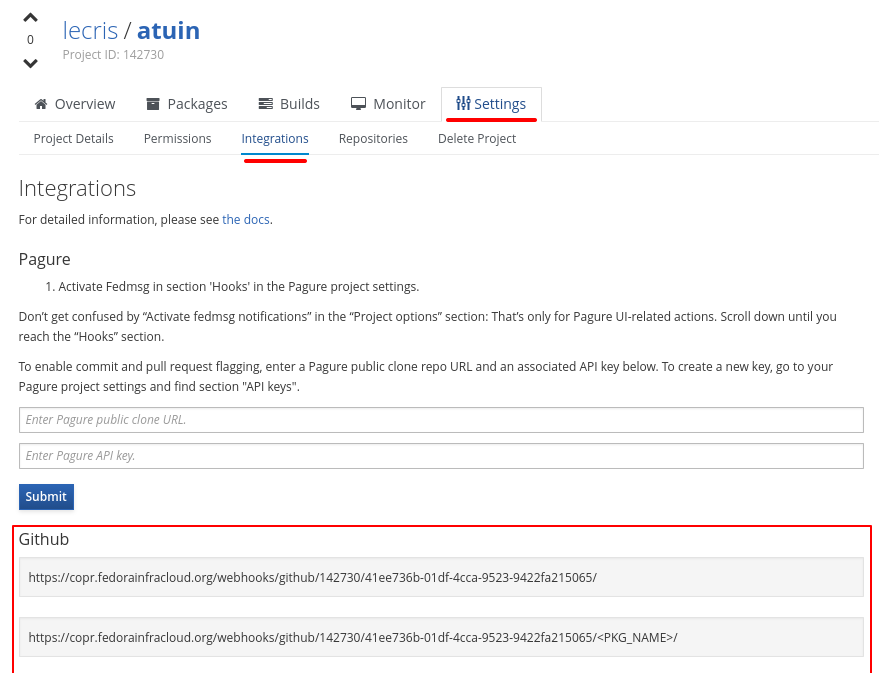
First, similar to the Packit integration, you need to setup a dist-git-like repo and configure webhooks on that repo.
All packages must be setup manually with the git repo that they belong to.
The default build method using rpkg should work out-of-the-box on
dist-git-like repos.
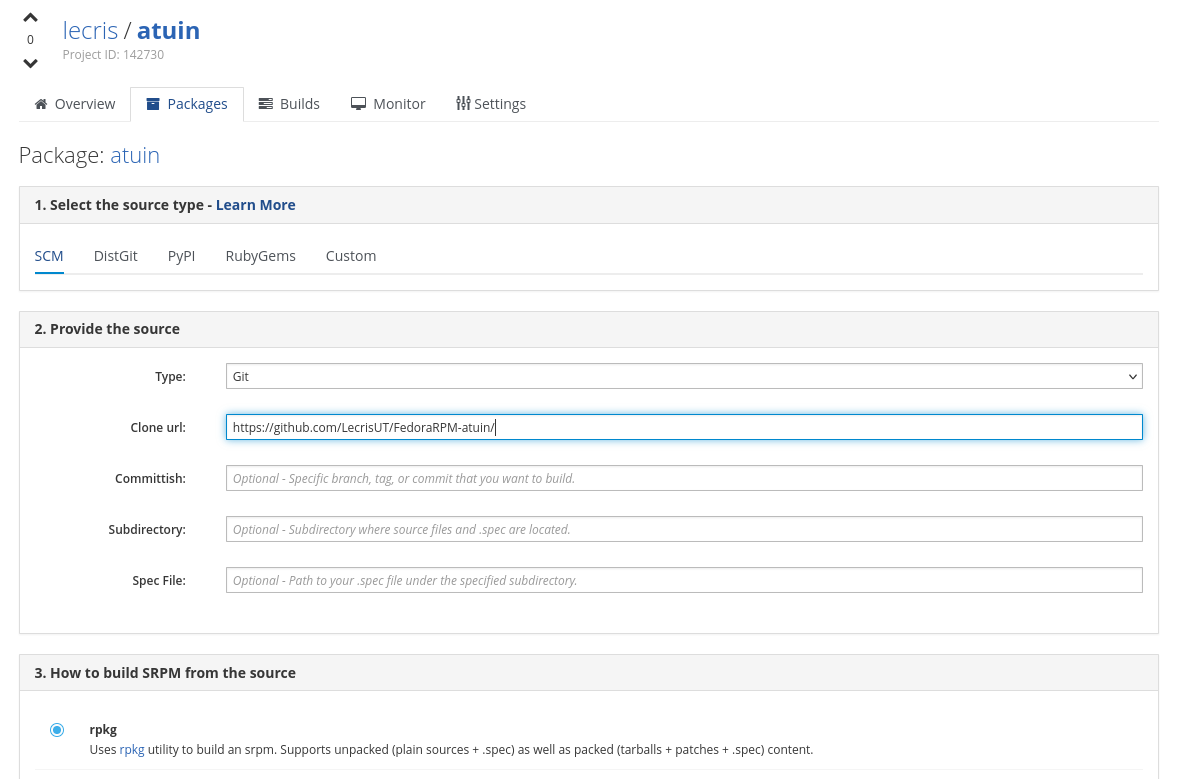
Make sure you enable the Auto-rebuild option.
This should then trigger copr builds for each commit, however, this integration does not support reporting back the build results, pull-requests, or other more complex integrations than just triggering builds. For that use the Packit integration instead.